
WordPress Security Plugins: 6 Good Options and a 10-Step Checklist to Protect Your Site
WordPress security plugins add a firewall, a malware scanner and login protection to your website, but no single plugin keeps a site safe on its own. The right setup is one good security plugin, regular updates, strong logins and off-site backups. For most business sites, Wordfence, Sucuri Security or Solid Security covers the plugin side well.
Below we compare the main options, explain what each one actually does, and give you a 10-step checklist to secure a WordPress website properly.
Why WordPress sites get hacked
WordPress itself is well maintained, and minor core releases update automatically. Most hacks come from what sits around it:
- Outdated plugins and themes with known vulnerabilities
- Weak or reused admin passwords, guessed by bots that try thousands of logins
- Nulled (pirated) themes and plugins, which often ship with hidden malware
- Old PHP versions and poorly secured hosting
- Too many admin users, including ex-staff and agencies who no longer need access
A hacked site can redirect visitors to spam pages, send spam from your server, get blacklisted by Google, or leak customer data from forms and orders.
What WordPress security plugins do
Most security plugins combine some of these features:
- Firewall (WAF): blocks known attack patterns before they reach WordPress
- Malware scanner: compares your files with clean copies and flags injected code
- Login protection: limits failed login attempts, adds two-factor authentication (2FA) and CAPTCHA
- File change alerts: emails you when core files are edited
- Activity log: records who logged in and what they changed
- Hardening: one-click fixes such as disabling file editing from the dashboard
6 WordPress security plugins compared
| Plugin | Firewall | Malware scan | Best for |
|---|---|---|---|
| Wordfence | Yes, runs on your server | Yes | Most business sites wanting one plugin that does it all |
| Sucuri Security | Cloud firewall on paid plan | Remote scan | Sites that want auditing free and a cloud firewall plus cleanup paid |
| Solid Security (formerly iThemes Security) | Basic | Paid tiers | Strong login rules, 2FA and hardening |
| All-In-One Security (AIOS) | Yes, basic | Limited | Simple free hardening for small sites |
| MalCare | Yes | Yes, runs on its own servers | Agencies and slow servers, as scans do not load your hosting |
| Jetpack Protect | Paid plan | Vulnerability check | Sites already using Jetpack |
Each of these has a free version and paid upgrades. Feature lists change often, so check the current plan details on the plugin’s own page before you choose.
Use only one security plugin with a firewall. Two firewalls or two scanners running together slow the site down and can lock you out of your own dashboard.
10-step WordPress security checklist
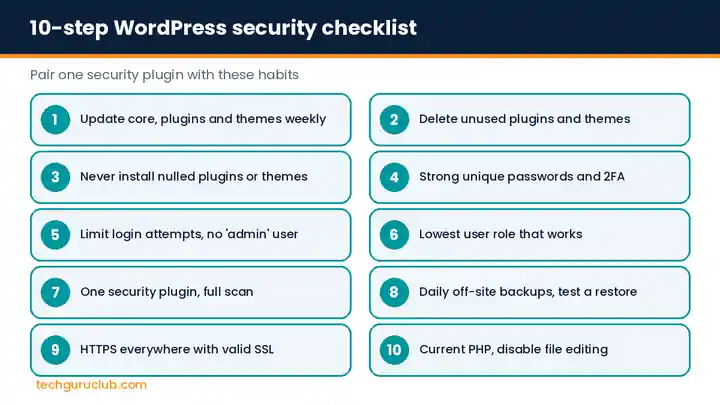
- Update everything weekly. WordPress core, plugins and themes. Turn on automatic updates for plugins you trust.
- Delete what you do not use. Deactivated plugins and old themes can still be attacked. Remove them.
- Never install nulled plugins or themes. Buy from the developer or use free versions from WordPress.org.
- Use strong, unique passwords and 2FA for every administrator account.
- Limit login attempts and change the default
adminusername if you still have it. - Give the lowest role that works. Content writers should be Authors or Editors, not Administrators. Remove ex-staff and old agency accounts.
- Install one security plugin from the list above and run a full scan.
- Take daily off-site backups. A backup stored on the same server is lost if the server is hacked or fails. Test a restore at least once.
- Use HTTPS everywhere with a valid SSL certificate, so logins and form data are encrypted.
- Keep PHP up to date and harden the server. Add
define('DISALLOW_FILE_EDIT', true);towp-config.phpso nobody can edit code from the dashboard, and disable XML-RPC if you do not use the mobile app or Jetpack.
WordPress malware removal: what to do if your site is hacked
- Put the site in maintenance mode and change every password: WordPress admins, hosting, FTP and database.
- Run a full malware scan and note the infected files.
- Restore a clean backup from before the hack if you have one. If not, replace WordPress core files and reinstall plugins and themes from fresh copies.
- Check for unknown admin users and remove them.
- Update everything, then rescan.
- If Google shows a “This site may be hacked” warning, request a review in Google Search Console once the site is clean.
If the infection keeps coming back, there is usually a hidden backdoor file. That is the point to call in a professional cleanup service.
Frequently asked questions
Do I need a security plugin if my hosting has a firewall?
A server or cloud firewall stops many attacks, but it cannot see inside WordPress. A plugin adds login protection, file change alerts and an activity log. Use both, but only one plugin-level firewall.
Are free WordPress security plugins enough?
For a small brochure site, a free plugin plus updates, 2FA and off-site backups is a solid base. Online stores and sites with customer logins should consider a paid plan with a real-time firewall and malware cleanup.
Will a security plugin slow down my website?
Plugins that scan on your own server use some resources, especially on cheap shared hosting. Schedule scans for low-traffic hours, or choose a plugin that scans on its own servers.
How do I know if my WordPress site is hacked?
Common signs are unknown admin users, strange redirects on mobile, spam pages in Google results for site:yourbusiness.in, a sudden drop in traffic, or a warning from your host about outgoing spam.
Protect your WordPress site with Tech Guru Club
Tech Guru Club offers SiteLock website security for daily malware scanning, automatic removal and a web application firewall, and CodeGuard backup for automatic off-site backups with one-click restore. Our Premium Cloud Linux Hosting includes a free SSL on every plan. Think your site is already infected? Contact our team and we will help you clean it up and lock it down.
Related reading: how to buy an SSL certificate, how to get a domain name in India and Linux VPS hosting.


