
How to Buy an SSL Certificate in India: DV vs OV vs EV and Step-by-Step Setup
To buy an SSL certificate, pick the type your website needs (DV, OV or EV, single, wildcard or multi-domain), generate a CSR on your server, place the order with a provider, prove you control the domain, and install the certificate your provider sends. A basic DV certificate is usually issued within minutes; OV and EV take one to five business days because a real person checks your company documents.
This guide walks through each step, explains which certificate suits which website, and covers the 2026 change to SSL validity that every site owner needs to know about.
What an SSL certificate does
An SSL (more accurately TLS) certificate encrypts the connection between your website and the visitor’s browser, and confirms that the site really belongs to your domain. With it, your address starts with https:// and browsers show the padlock. Without it, Chrome and other browsers mark the site as Not secure, which drives visitors away from contact forms and checkout pages.
Step 1: Choose the right type of SSL
Every SSL certificate uses the same strength of encryption. The difference is how carefully the certificate authority (CA) checks who you are before issuing it.
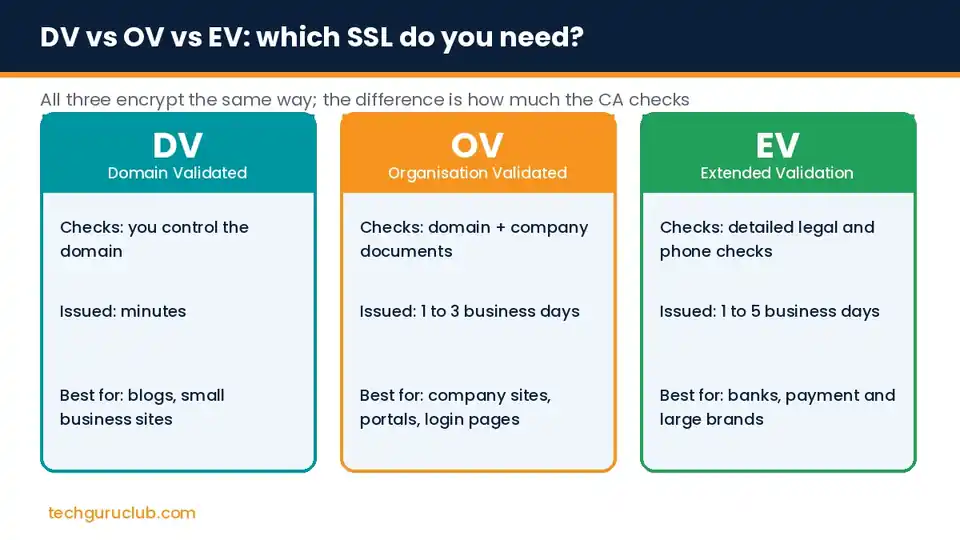
- DV (Domain Validated): the CA only checks that you control the domain. Issued in minutes. Good for blogs, portfolios and small business sites.
- OV (Organisation Validated): the CA also checks your company registration. Visitors can see your verified organisation name in the certificate details. Good for company websites, customer portals and login pages.
- EV (Extended Validation): the strictest checks, including legal existence and a phone verification. Used by banks, payment pages and large brands.
Then decide how many names it must cover:
- Single domain: one address, for example
yourbusiness.in(most providers also cover thewwwversion). - Wildcard: one domain and all its first-level subdomains, such as
*.yourbusiness.inforshop.,mail.andportal.. - Multi-domain (SAN or UCC): several different domains on one certificate, useful when one company runs many websites.
Step 2: Generate a CSR
A CSR (Certificate Signing Request) is a block of encoded text created on your server. It contains your domain name and organisation details, and it creates the private key that stays on your server.
- cPanel or a hosting control panel: open SSL/TLS, choose Generate a CSR, fill in the domain and company details.
- Linux server: run
openssl req -new -newkey rsa:2048 -nodes -keyout yourbusiness.key -out yourbusiness.csrand answer the prompts. - Windows Server (IIS): use Server Certificates and Create Certificate Request.
Keep the private key file safe. If you lose it, the certificate cannot be installed and must be reissued.
Step 3: Place the order
Pick a certificate, paste your CSR into the order form and choose how you will prove domain control. Compare brands on the warranty amount, issuance time, the number of domains covered and the support you get with installation, not only the price.
Step 4: Complete validation
- Email: the CA sends an approval link to an address such as
admin@yourbusiness.in. - DNS: you add a TXT or CNAME record the CA gives you. This is the easiest method if you manage your own DNS.
- File upload: you place a small text file on your website at a set path.
- OV and EV only: the CA also checks company registration documents, and for EV calls a verified phone number. Keep your GST certificate or incorporation documents ready to speed this up.
Step 5: Install the certificate
The CA sends your certificate and an intermediate CA bundle. Install both on your server; a missing intermediate is the most common reason some phones show a security warning while your own laptop does not.
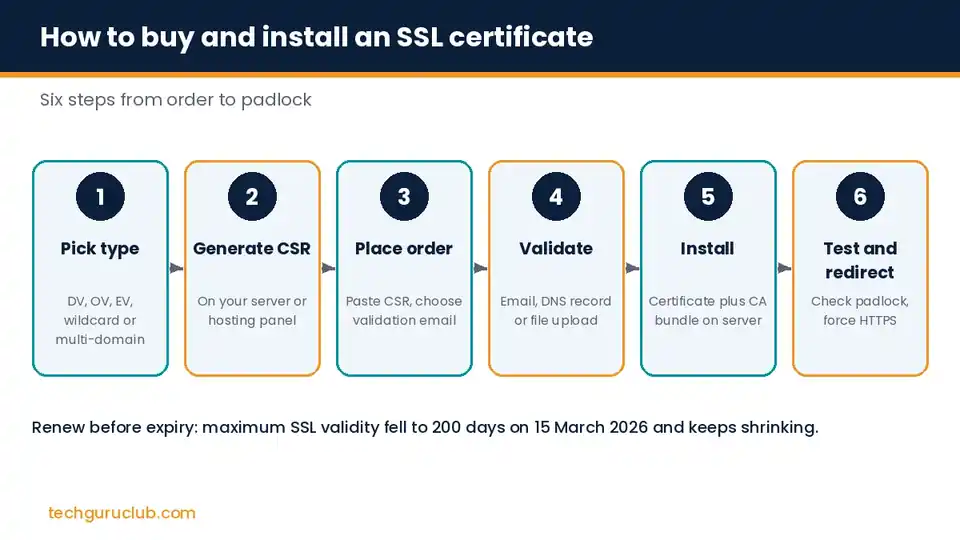
Step 6: Test and redirect to HTTPS
- Open your site with
https://and check the padlock on desktop and mobile. - Run a free SSL checker to confirm the chain is complete.
- Redirect all
http://traffic tohttps://in your server or hosting settings. - In WordPress, update the site address under Settings, General and fix any old
http://image links.
The 2026 change: shorter SSL validity
The CA/Browser Forum, which sets the rules for public SSL certificates, has voted to shorten how long a certificate can stay valid:
| Certificates issued from | Maximum validity |
|---|---|
| 15 March 2026 | 200 days |
| 15 March 2027 | 100 days |
| 15 March 2029 | 47 days |
You can still buy a one-year or multi-year SSL plan, but the certificate itself will be reissued and reinstalled several times within that plan. If your hosting supports automatic installation, turn it on. If you install certificates by hand, put the expiry date in your calendar. See the validity change timeline for the full schedule.
Free SSL or paid SSL?
Free DV certificates such as Let’s Encrypt encrypt traffic exactly as well as paid DV certificates. Paid certificates make sense when you need:
- OV or EV validation that shows your verified company name
- A wildcard or multi-domain certificate with support for installation
- A warranty, which some clients, tenders and payment partners ask for
- Help from a person when something breaks
Many hosting plans already include a free SSL. Our Premium Cloud Linux Hosting plans, for example, come with a free SSL certificate on every plan.
Frequently asked questions
How much does an SSL certificate cost in India?
Basic DV certificates start at around ₹1,250 for a single domain. OV certificates usually cost several thousand rupees, and EV, wildcard and multi-domain certificates cost more. GST at 18% is added on Indian invoices.
How long does SSL issuance take?
DV: usually minutes. OV: one to three business days. EV: one to five business days, depending on how quickly your company documents and phone verification are completed.
Can I move my SSL certificate to a new host?
Yes, if you have the certificate, the intermediate bundle and the private key. If you do not have the private key, ask your provider to reissue the certificate with a new CSR.
Does SSL help SEO?
HTTPS is a light ranking signal for Google, and browsers warn visitors on sites without it, so every business website should have one.
Do I need a separate SSL for my business email?
Your email provider secures its own mail servers. You only need your own certificate if you run a mail server on your domain. For email delivery, look at SPF, DKIM and DMARC instead.
Buy an SSL certificate with help on installation
Tech Guru Club offers SSL certificates from DigiCert, Sectigo, GeoTrust, Thawte and RapidSSL, from DV to EV, single domain to wildcard, with INR billing and GST invoices. Not sure which one fits? Tell us your domain and use case, and our team will recommend the right certificate and help with installation.
Related reading: Linux VPS hosting, what is VPS hosting and best web hosting for small business in India.


