
SPF, DKIM and DMARC Explained: Stop Your Business Emails Going to Spam
If your invoices, quotes or follow-up mails keep landing in the client’s spam folder, the problem is usually not what you wrote. It is that your domain has not proved it is really you. SPF, DKIM and DMARC are three small DNS records that do exactly that. SPF lists the servers allowed to send mail for your domain, DKIM adds a tamper-proof signature to every message, and DMARC tells Gmail, Outlook and Yahoo what to do when a mail fails those checks.
This guide explains each record in plain words, shows real examples you can copy, and walks you through the setup order we follow for clients at Tech Guru Club.
Quick answer: what are SPF, DKIM and DMARC?
- SPF (Sender Policy Framework) is a TXT record that lists which mail servers and services may send email using your domain name.
- DKIM (DomainKeys Identified Mail) attaches a digital signature to each outgoing email. The receiving server checks it against a public key published in your DNS to confirm the message was not changed on the way.
- DMARC (Domain-based Message Authentication, Reporting and Conformance) ties the two together. It checks that SPF or DKIM passes for the same domain shown in the “From” line, sets a policy for failures (none, quarantine or reject), and sends you reports.
Think of it like a courier delivery to an office. SPF is the list of approved delivery boys at the gate. DKIM is the company seal on the parcel. DMARC is the security guard’s instruction sheet that says what to do if the seal is broken or the delivery boy is not on the list.
Why these records matter more in 2026
Email authentication used to be a “good to have”. That changed when the big mailbox providers started enforcing it.
- Google and Yahoo (from February 2024): every sender needs SPF or DKIM, and bulk senders mailing more than 5,000 messages a day to Gmail need SPF, DKIM and DMARC, along with one-click unsubscribe for marketing mail. Google lists the full rules in its email sender guidelines.
- Microsoft Outlook.com (from May 2025): high-volume senders to Outlook, Hotmail and Live addresses must pass SPF, DKIM and DMARC as well.
- Spoofing and invoice fraud: without DMARC, anyone can send a mail that shows accounts@yourcompany.in in the From line. Fake payment-change requests to vendors are one of the most common frauds Indian SMEs report.
Even if you send only a few dozen mails a day, a domain with no authentication looks much like a forger to the receiving server. That is why new domains, freshly migrated mailboxes and small offices see the most spam-folder trouble.
How the three checks work together
When your mail reaches a Gmail or Outlook server, it runs the checks in roughly this order:
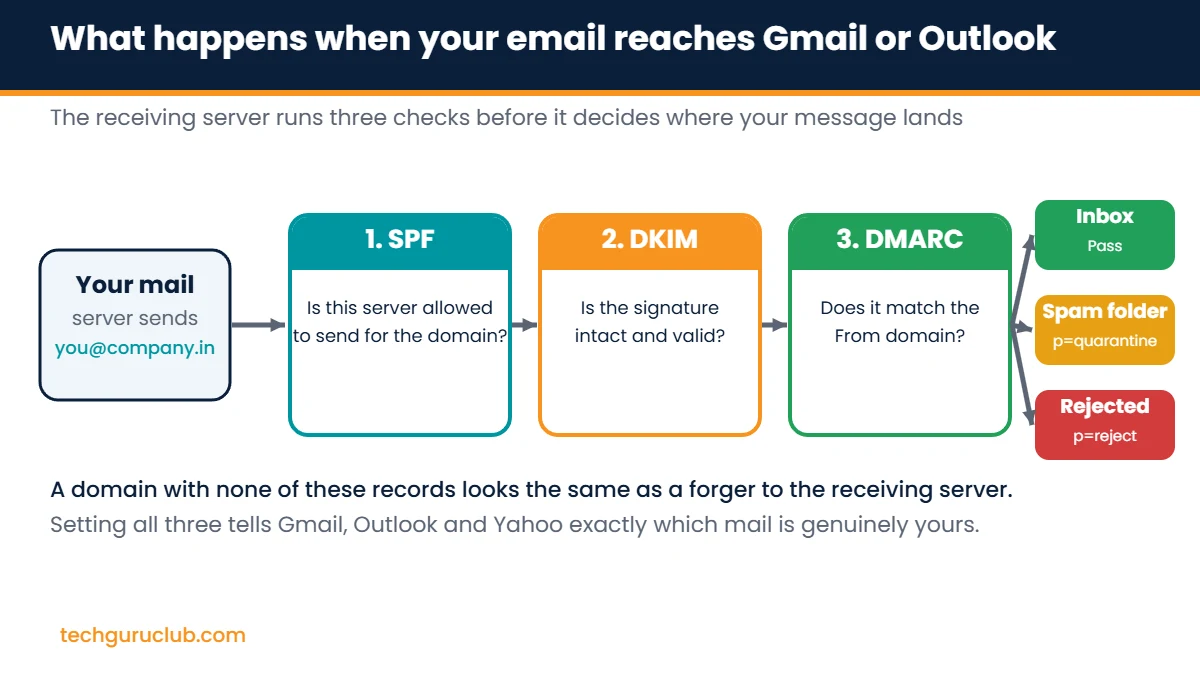
- SPF check: the server looks at the IP address that delivered the mail and checks whether it appears in your SPF record.
- DKIM check: it reads the signature in the mail header, fetches your public key from DNS and confirms the content was not altered.
- DMARC check: it confirms that at least one of the passing checks belongs to the same domain the reader sees in the From address (this is called alignment). Then it applies your policy.
The result decides whether the mail goes to the inbox, the spam folder or gets bounced.
SPF explained, with an example
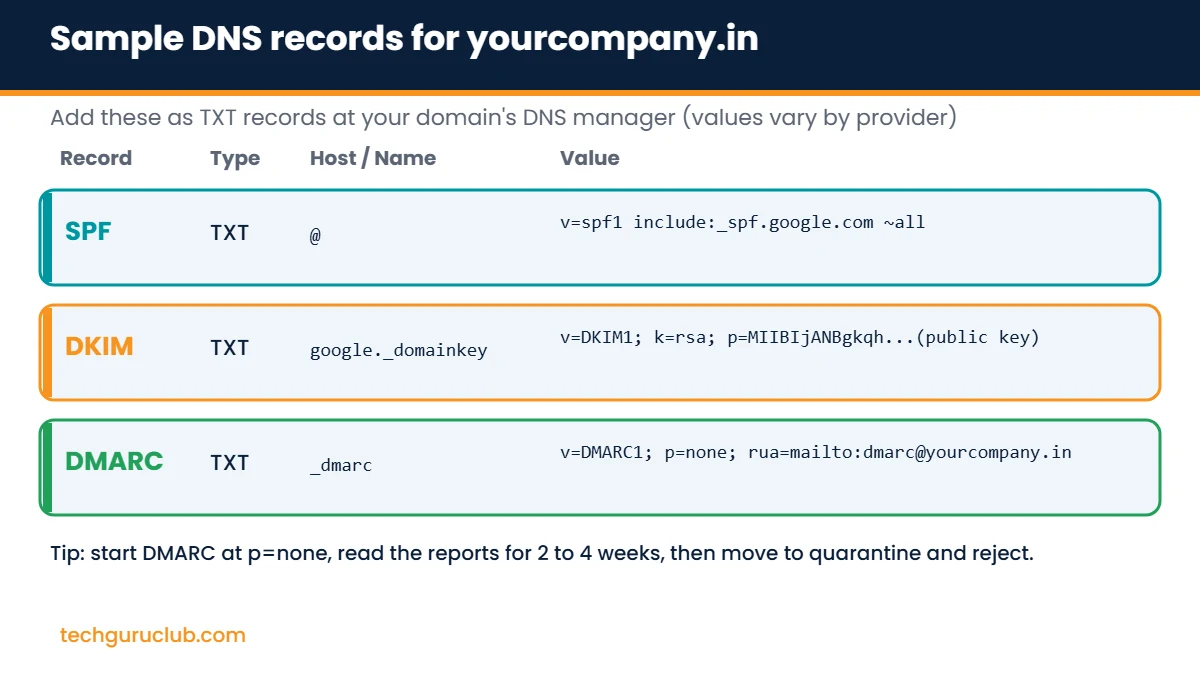
An SPF record is a single TXT record on your root domain (the host is usually written as @). A typical record for a company on Google Workspace looks like this:
v=spf1 include:_spf.google.com ~all
v=spf1marks it as an SPF record.include:adds the sending servers of a provider. Microsoft 365 usesinclude:spf.protection.outlook.com. Zoho Mail shows a value that depends on your data centre. Your email host will always give you the exact value.~all(soft fail) means “anything not listed is suspicious”.-all(hard fail) means “anything not listed is not mine”. Start with~alland tighten once you are sure every service is included.
Common SPF mistakes we fix every week
- Two SPF records on one domain. You are allowed only one. If you add Zoho on top of an old hosting record, merge them into a single line.
- Forgetting other senders. Your billing software, website contact form, CRM or bulk mail tool also sends as your domain. Each one needs its include, or its mail fails SPF.
- Going past 10 DNS lookups. SPF stops at 10 lookups. Every
includecounts, and nested includes count too. Too many and the whole record breaks.
DKIM explained, with an example
DKIM works with a pair of keys. Your email provider keeps the private key and signs every outgoing message. You publish the public key in DNS so the world can verify the signature.
The record sits on a special host called a selector, for example google._domainkey for Google Workspace or selector1._domainkey for Microsoft 365. The value looks like this (shortened):
v=DKIM1; k=rsa; p=MIIBIjANBgkqhkiG9w0BAQEFAAOC...
- Generate the key from your provider’s admin panel. Do not try to create one by hand.
- Choose a 2048-bit key where your DNS host allows it. 1024-bit keys still work but are weaker.
- After publishing, go back to the admin panel and click Start authentication or Enable. Adding the record alone does not switch signing on, and this is the step most people miss.
DMARC explained, with an example
DMARC lives on the host _dmarc. A safe starting record is:
v=DMARC1; p=none; rua=mailto:dmarc@yourcompany.in
p=noneonly monitors. Nothing is blocked, but you start receiving daily reports.p=quarantinetells receivers to send failing mail to spam.p=rejecttells them to refuse failing mail outright. This is full protection against spoofing.rua=is the mailbox that receives aggregate reports. Use a separate address, as the reports arrive as zipped XML files every day.pct=(optional) applies the policy to only a percentage of failing mail, which helps you tighten slowly.
Step-by-step: set up SPF, DKIM and DMARC for your domain
- List every service that sends mail as your domain. Your mailbox provider, website server, accounting or billing tool, CRM and any newsletter platform.
- Open your DNS manager. This is wherever your domain’s nameservers point: your registrar, your hosting control panel or Cloudflare.
- Publish one SPF record that includes every sender from step 1, ending in
~all. - Generate and publish DKIM for each sender that supports it, then switch signing on in each admin panel.
- Add DMARC at
p=nonewith a reporting address. - Wait for DNS to update. Most changes show within an hour, but allow up to 48 hours.
- Test. Send a mail to a Gmail account, open it, click the three dots and choose Show original. You want to see PASS next to SPF, DKIM and DMARC.
- Read reports for two to four weeks, fix any genuine sender that fails, then move to
p=quarantineand finallyp=reject.
Where to add these records on popular email platforms
| Email platform | SPF include value | Where to get DKIM |
|---|---|---|
| Google Workspace | include:_spf.google.com |
Admin console, Apps, Gmail, Authenticate email |
| Microsoft 365 | include:spf.protection.outlook.com |
Microsoft Defender portal, Email authentication settings, DKIM |
| Zoho Mail (India data centre) | Shown in the Zoho admin console (depends on your data centre) | Admin console, Domains, Email configuration, DKIM |
| Premium Cloud Email Hosting | Provided in your control panel | Control panel, Email, Authentication |
Menu names change from time to time, so always confirm the exact value inside your own admin panel before you publish.
Still landing in spam after setup?
Authentication gets you through the door, but reputation decides the room you sit in. If all three checks pass and mail still goes to spam, look at these:
- Sending volume jumped suddenly. New domains should warm up slowly, starting with a few dozen mails a day.
- Your IP or domain is on a blocklist. Check it on a public blacklist lookup tool.
- Content triggers filters. Image-only mails, link shorteners and all-caps subject lines hurt.
- Incoming spam is the real headache? That is a different job. An email spam filter cleans what comes in, while SPF, DKIM and DMARC protect what goes out.
Frequently asked questions
Do I need all three, or is SPF enough?
SPF alone breaks when mail is forwarded, and it does not protect the From address your reader sees. For reliable delivery and spoofing protection you need all three. Google and Microsoft both require all three for bulk senders.
Will DMARC block my own emails?
Not at p=none. That is why you start there. Reports show you which genuine services are failing, so you can fix them before moving to quarantine or reject.
How long does it take for the records to work?
Usually under an hour, sometimes up to 48 hours, depending on the TTL set on your DNS records.
Can I have more than one DKIM record?
Yes. Each sending service uses its own selector, so you can have one for Google Workspace, one for your newsletter tool and one for your billing software, all on the same domain.
I use a free Gmail address. Do I need any of this?
No. These records apply to your own domain. If you are still sending from a free address, start by moving to a professional address on your own domain.
Need a hand with your DNS?
A wrong character in a TXT record can stop mail for the whole office, so many of our customers ask us to do it for them. If you host your email or domain with Tech Guru Club, our support team sets up SPF, DKIM and DMARC as part of onboarding. Compare plans on our email hosting for business page, or contact our team with your domain name and we will check your current records.
Related reading: Rediffmail vs Zoho Mail vs Google Workspace vs Microsoft 365: India pricing.


