
How to Create a Business Email Address: Step-by-Step Guide (2026)
To create a business email, you need two things: a domain name (like yourbusiness.in) and an email hosting service that runs mailboxes on that domain. Once you connect the two through a few DNS records, you can send and receive mail as you@yourbusiness.in from your phone, laptop or browser. The whole process takes under an hour if your domain is ready.
Below is the exact process we use when setting up business email for shops, CA firms, clinics and offices across India, including the parts most guides skip.
What is a business email (and why a Gmail ID is not enough)?
A business email is an address that ends in your own company domain instead of a free provider like gmail.com or yahoo.com. It is also called a professional email, company email or domain email.
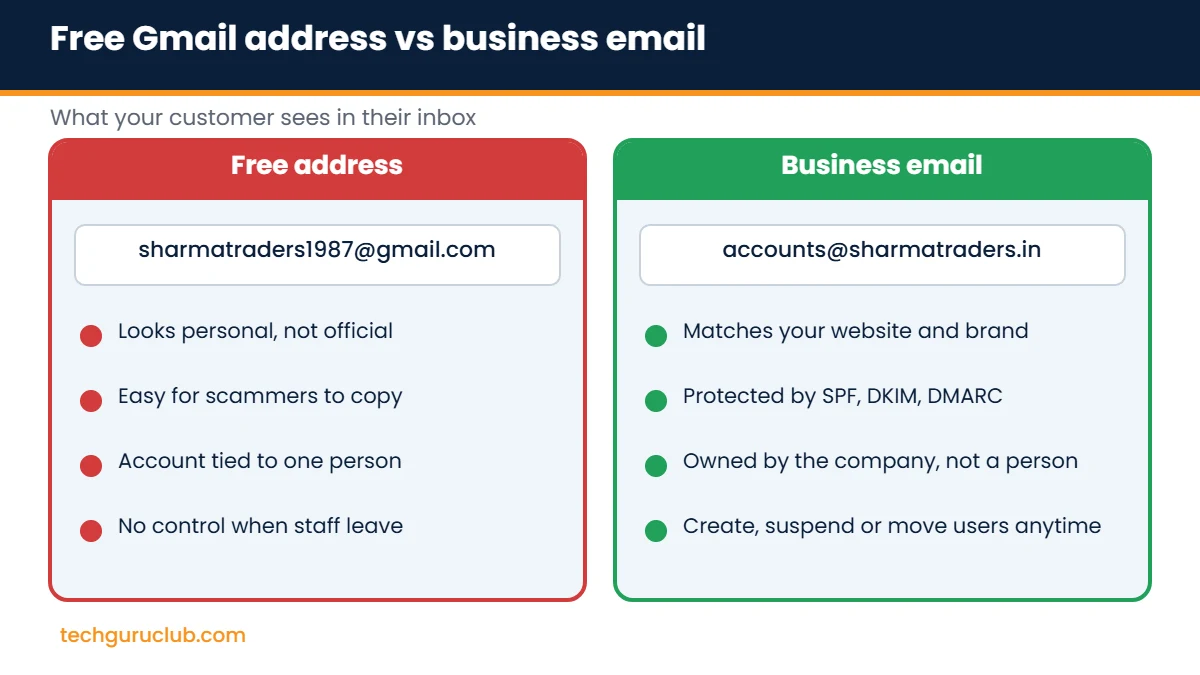
Plenty of small businesses in India still run on addresses like sharmatraders1987@gmail.com. It works, but it costs you in ways that are easy to miss:
- Trust: a customer comparing two quotes will lean towards the one sent from a proper company address.
- Fraud risk: anyone can create a similar-looking Gmail ID and send your vendors a fake “bank details changed” mail.
- Ownership: a free account belongs to the person who made it. When a staff member leaves, the customer history often leaves too.
- Tender and marketplace rules: many government portals, corporate vendor forms and B2B platforms ask for an official email ID.
What you need before you start
- A domain name. If you have a website, you already own one. If not, you can register one in a few minutes. A .in or .com domain usually costs a few hundred rupees a year.
- Access to the domain’s DNS settings. This is in your registrar’s panel, your web hosting control panel or a service like Cloudflare.
- A list of users. Decide who needs a mailbox (rahul@, accounts@, sales@) and who can share one through an alias.
- A budget per user per month. Paid plans in India start at roughly ₹125 to ₹140 per user per month, depending on the provider and storage.
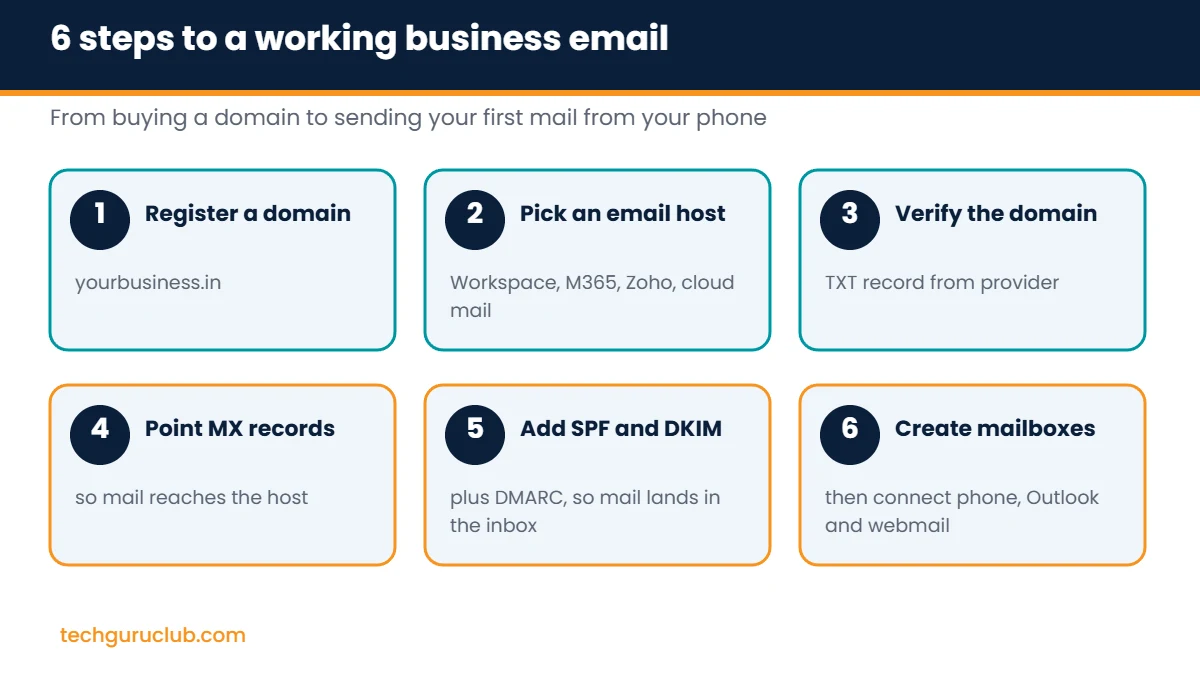
How to create a business email: 6 steps
Step 1: Register or pick your domain
Keep it short, easy to spell over the phone and close to your brand name. Avoid hyphens and numbers where you can. If your website already runs on a domain, use the same one so your email and website match.
Step 2: Choose an email hosting provider
This is the biggest decision, because switching later means migrating every mailbox. Here is how the main options compare for a typical Indian business:
| Provider | Best for | What you get |
|---|---|---|
| Google Workspace | Teams already comfortable with Gmail | Gmail on your domain, Drive, Meet, Docs, Calendar |
| Microsoft 365 | Offices that live in Excel, Word and Outlook | Outlook, Teams, OneDrive, Office apps on most plans |
| Zoho Mail | Budget-conscious small teams | Ad-free mail, calendar, Indian data centre option |
| Rediffmail | Teams wanting pooled storage | Storage shared across all mailboxes |
| Premium Cloud Email Hosting | Mail only, no office suite | Webmail, IMAP, POP and SMTP, spam filtering |
For a full price-by-price breakdown, see our India pricing comparison of Rediffmail, Zoho, Google Workspace and Microsoft 365.
Step 3: Verify that you own the domain
Every provider asks you to prove ownership before it accepts mail for your domain. You will be given a TXT record (a line of text starting with something like google-site-verification= or zoho-verification=). Add it in your DNS manager, wait a few minutes and click Verify.
Step 4: Point your MX records to the new provider
MX (mail exchanger) records tell the internet where to deliver mail for your domain. Delete any old MX records and add the ones your provider gives you, with the same priority numbers. Until this step is done, incoming mail still goes to your old host.
- Do this step during a quiet hour, as mail may arrive at either host for a short while.
- If you already have mail on an old server, plan the migration first (see the next section).
Step 5: Add SPF, DKIM and DMARC
Skip this and your mail will very likely land in spam, especially at Gmail and Outlook. In short:
- SPF lists which servers may send as your domain.
- DKIM signs each mail so receivers can trust it was not changed.
- DMARC tells receivers what to do with mail that fails.
We have a separate, detailed walkthrough with sample records: SPF, DKIM and DMARC explained.
Step 6: Create mailboxes and connect your devices
- Create users in the admin panel and set strong temporary passwords.
- Add aliases (sales@, info@, support@) to existing mailboxes instead of paying for extra users where possible.
- Switch on two-step verification for every user, starting with admin accounts.
- Install the provider’s mobile app, or add the account in your phone’s mail app using IMAP and SMTP settings.
- Set up a company signature with name, designation, phone number and website.
Moving from Gmail or an old host without losing mail
If your team already has years of mail on a free account or an old cPanel server, plan the move before you change MX records:
- Create the new mailboxes first, but leave the MX records unchanged.
- Use the provider’s migration tool (or IMAP sync) to copy old mail, contacts and calendar entries.
- Change the MX records once the copy is done.
- Run a final sync 24 to 48 hours later to catch anything that arrived in between.
- Set an auto-reply or forward on the old free address for a few months so contacts learn the new one.
Can you create a business email for free?
Yes, with limits. Zoho Mail’s Forever Free plan allows up to five users with 5 GB each on one domain, but it works only through the web and Zoho’s own app, without IMAP or POP, so you cannot connect it to Outlook or your phone’s default mail app. You still have to pay for the domain.
Free plans suit a solo founder testing an idea. Once you have staff, customers sending purchase orders, or a need for Outlook on desktop, a paid plan saves time and support headaches.
Business email naming ideas that age well
- firstname@ for individuals (rahul@, priya@). Simple and personal.
- firstname.lastname@ if your team has, or will have, people with the same first name.
- Role addresses such as accounts@, sales@, support@ and hr@. These stay with the company when people change jobs.
- Avoid numbers, birth years and nicknames. You will be printing this on invoices and visiting cards for years.
Common mistakes to avoid
- Leaving the old MX records in place alongside the new ones.
- Skipping SPF and DKIM, then wondering why clients never receive quotes.
- Letting one employee hold the only admin password.
- Registering the domain in a freelancer’s or developer’s personal account. Always keep it in the company’s name and login.
- Buying the biggest plan for every user. Most staff need far less storage than the top tier.
Frequently asked questions
How much does a business email cost in India?
Paid plans for well-known providers start at roughly ₹125 to ₹140 per user per month, plus GST and the yearly domain fee. Annual billing is usually cheaper than monthly.
Can I use my business email inside the Gmail app?
Yes. With Google Workspace it is Gmail. With other providers you can add the account to the Gmail app through IMAP, as long as your plan includes IMAP access.
How long does setup take?
Creating mailboxes takes minutes. DNS changes usually show within an hour but can take up to 48 hours. Migrating old mail can take longer depending on how much data you have.
Do I need a website to have a business email?
No. You need a domain, not a website. Many businesses start with email first and build the website later.
Which is better for a small business, Google Workspace or Microsoft 365?
If your team works mostly in the browser and on phones, Google Workspace feels easier. If people already use Excel and Word on desktop every day, Microsoft 365 usually makes more sense.
Get your business email set up the easy way
Tech Guru Club offers Google Workspace, Microsoft 365, Zoho Mail, Rediffmail and our own cloud email, with domain registration and DNS setup handled by our team. Compare every option on the email hosting for business page or talk to us and we will recommend a plan that fits your team size and budget.
Related reading: SPF, DKIM and DMARC explained and best web hosting for small business in India.


